Home
SystemStar Guided Tour
SystemStar Features
SystemStar Facts
Download Demo
Price List
Training
COCOMO Overview
COCOMO History
COCOMO Cost Drivers
COCOMO II Features
Function Points
Incremental COCOMO
Calibration
COSYSMO Overview
COSYSMO Features
Links
FAQ
What's New
Contact Us
Home
SystemStar Guided Tour
SystemStar Features
SystemStar Facts
Download Demo
Price List
Training
COCOMO Overview
COCOMO History
COCOMO Cost Drivers
COCOMO II Features
Function Points
Incremental COCOMO
Calibration
COSYSMO Overview
COSYSMO Features
Links
FAQ
What's New
Contact Us
 Prev Page |
Start of Tour |
Next Page
Prev Page |
Start of Tour |
Next Page

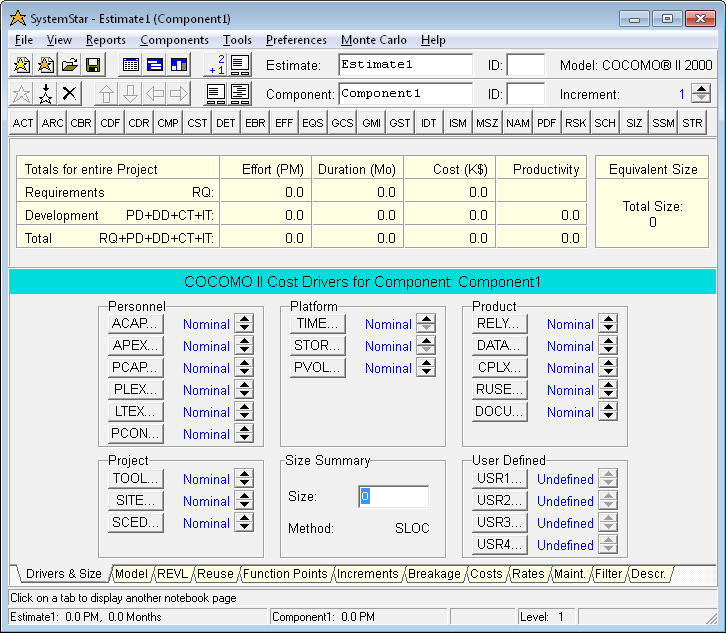
This is SystemStar's main window as it initially appears (assuming you skip over the Create Estimate Wizard). The main window displays all of the data related to the current estimate and current component.
SystemStar automatically creates an estimate named "Estimate1" with a single component called "Component1". The new estimate takes on default values from the default model (COCOMO II.2000).
The most important features of this window are 1) the menus, 2) the estimate toolbar, 3) the component toolbar, 4) the Automatic Estimation panel, and 4) a tabbed notebook .
Page 1 of 11